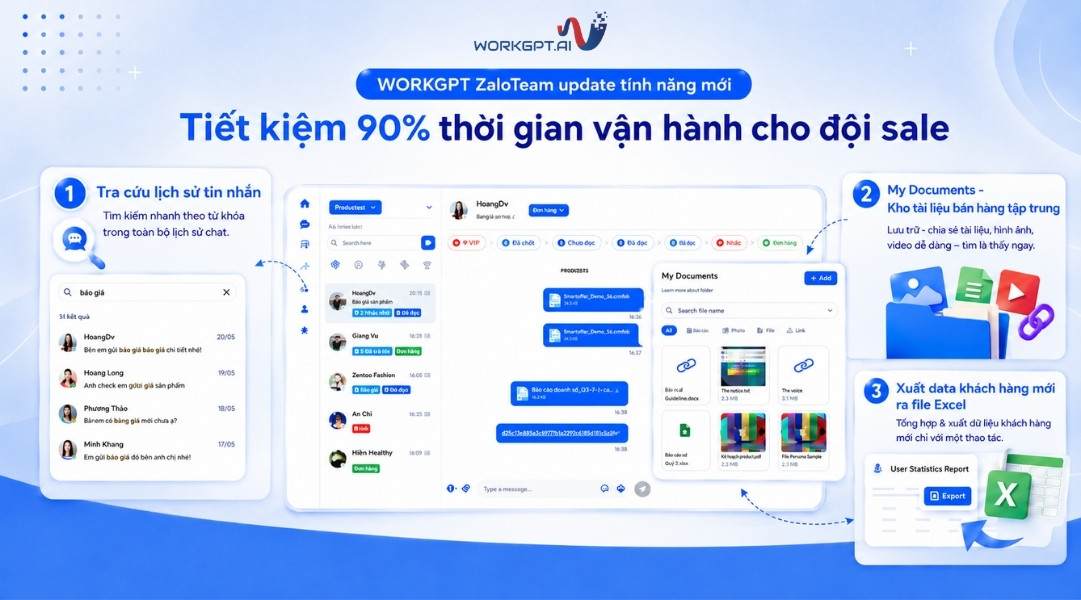
The latest WorkGPT ZaloTeam feature update helps sales and customer service teams save operational time, reduce manual tasks, and manage customer data in a more centralized way. Key new features include exporting new customer contact lists to Excel, searching message history by keyword, and managing sales materials directly within the chat interface.
With this update, businesses can handle everyday tasks more quickly, such as compiling customer data, retrieving previous consultation content, sending quotations, catalogues, product images, or introductory videos to customers. This is an important upgrade that helps sales teams work faster and more accurately while reducing dependence on memory or manual searching.
WorkGPT ZaloTeam launches new features to optimize operations
In this latest update, WorkGPT ZaloTeam adds 3 main feature groups designed to directly support customer management, customer service, and sales activities via Zalo.
These features are designed to solve common business challenges when sales teams handle many customers every day: time-consuming data compilation, difficulty retrieving old messages, scattered sales materials, and challenges in handing over customer information when staff changes occur.
Feature 1: Export new customer contact lists to Excel
The new customer contact export feature helps managers quickly compile and download customer data for contacts made within a selected period. Instead of manually gathering customer information from multiple conversations, businesses can export data directly from WorkGPT ZaloTeam in just a few steps.
How to use the new customer contact export feature
To export the new customer list to Excel, users can follow these steps:
Step 1: Go to New Contacts Report.
Step 2: Select the reporting period.
Step 3: Click Export.
Step 4: The system automatically downloads an Excel file containing the list of new customers.
Benefits of the Excel export feature
This feature significantly reduces the time required to compile new customer data. Instead of checking each conversation, copying information one by one, and re-entering it into a separate file, managers can retrieve the data in just a few seconds.
Businesses can use the Excel file to:
Track the number of new customers over different time periods.
Share data with the sales team or marketing department.
Hand over customer data when staff changes occur.
Import data into a CRM or another customer management system.
Run re-engagement campaigns for existing customer segments.
Standardizing contact data also helps businesses reduce missing information, lost customer data, and inconsistent data entry across team members.
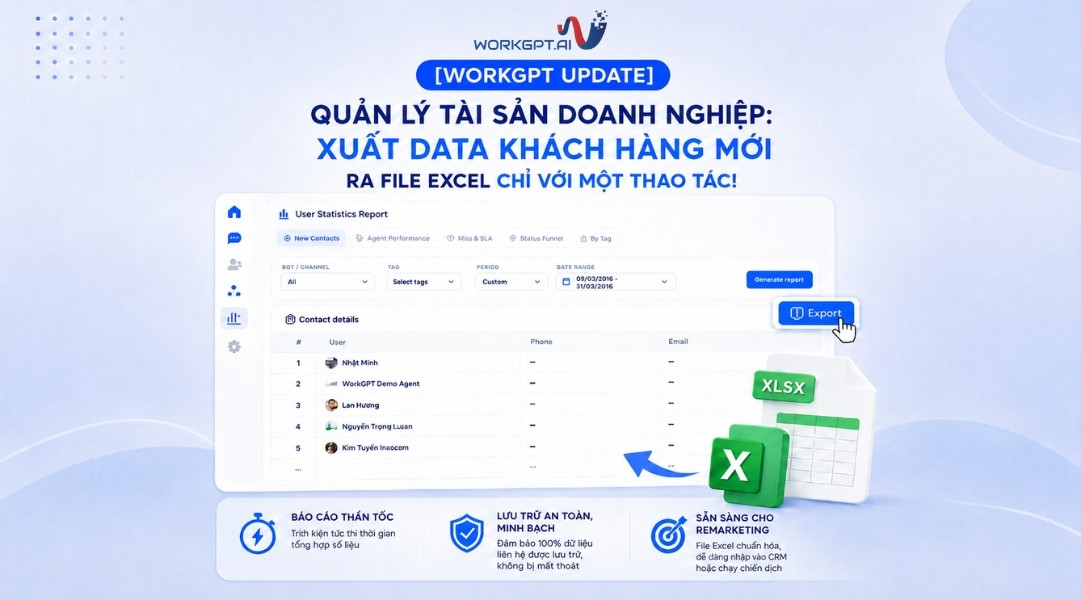
Export customer data to Excel
See also: INNOCOM officially becomes a Microsoft partner – Expanding digital solution capabilities for Vietnamese businesses
Feature 2: Search message history by keyword
One of the major challenges for sales teams using Zalo for customer care is finding previous consultation history. When a customer returns after a few days or weeks, staff often have to manually scroll through old conversations to remember what the customer asked about, which products they were interested in, or how far the consultation had progressed.
With the new message history search feature, WorkGPT ZaloTeam helps sales staff retrieve old information more quickly by entering keywords in the Chat Information section.
The system displays relevant messages together with their exact timestamps, allowing staff to quickly regain conversation context without manually searching through the entire chat history.
How does message history search help sales teams?
This feature directly supports situations such as:
Finding quotations previously sent to customers.
Checking which products or services a customer was interested in.
Reviewing previous consultation content before following up.
Finding important information such as budget, needs, appointments, or customer feedback.
Helping new staff understand customer care history after a handover.
Thanks to fast keyword-based search, sales and customer service teams can save up to 90% of the time spent finding old information, especially in businesses with a high daily conversation volume.
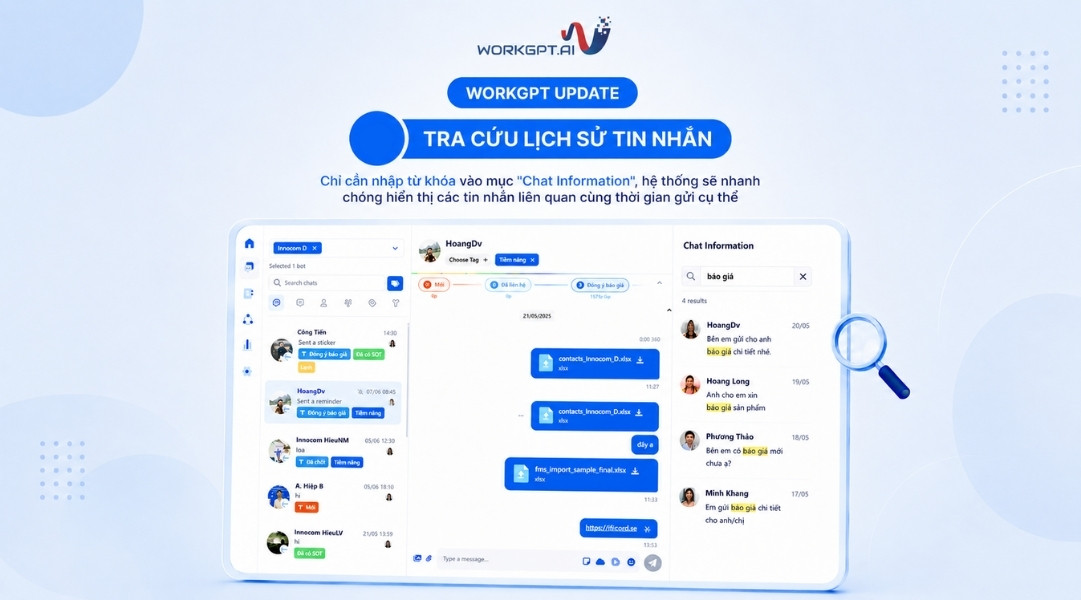
Search message history
Feature 3: My Documents – A centralized sales document library
In addition to message search, WorkGPT ZaloTeam also introduces My Documents – a centralized sales document library built directly into the system.
Instead of keeping quotations, catalogues, product images, introductory videos, or consultation materials scattered across personal computers, Google Drive, internal chat groups, or individual employee folders, sales teams can upload documents in advance to WorkGPT ZaloTeam.
When customers need information, sales staff can simply search for the relevant material in My Documents next to the chat box and send it in just a few steps.
How does My Documents help sales staff provide faster consultation?
The My Documents feature helps sales staff:
Quickly find quotations when customers ask about pricing.
Send product catalogues during consultations.
Share images, introductory videos, or sales materials with customers.
Reduce the risk of sending outdated files or materials that have not been updated.
Avoid wasting time searching across multiple folders.
Ensure the sales team uses one consistent set of materials.
For businesses with large sales teams, centralizing sales materials helps standardize the consultation process. New employees can also access approved materials more easily without repeatedly asking colleagues during their work.
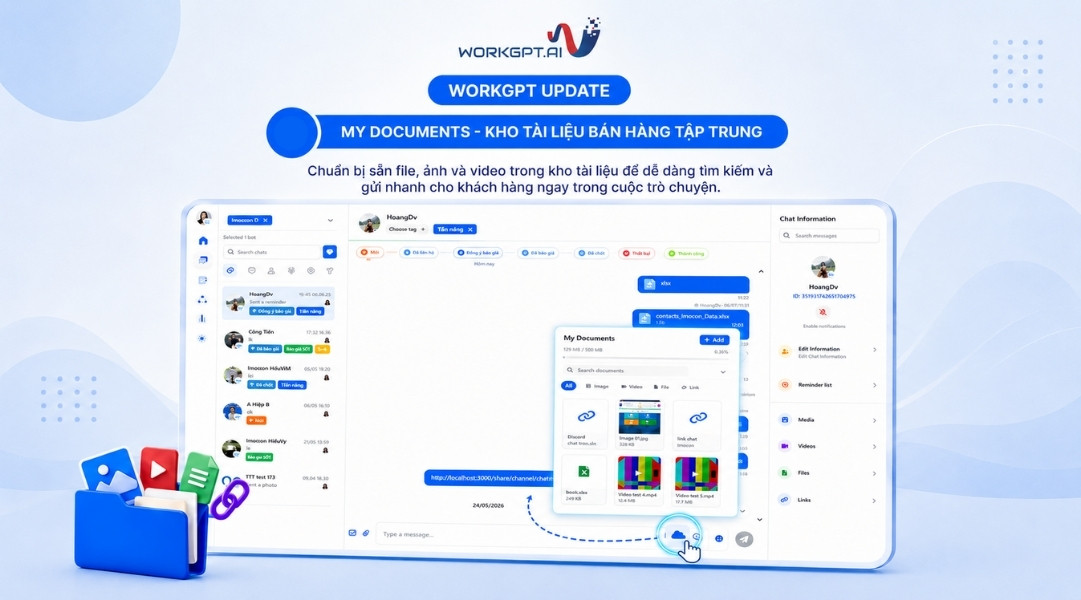
My Documents – A centralized sales document library
Why does the new update help sales teams save operational time?
The three new features of WorkGPT ZaloTeam all focus on one goal: reducing the time spent on repetitive tasks during customer consultation and customer care.
Previously, sales teams often spent significant time on tasks such as:
Finding old customer messages.
Manually compiling lists of new customers.
Copying phone numbers and emails into Excel files.
Searching for quotations, catalogues, or sales materials.
Asking colleagues again about previous consultation content.
Handing over customers without complete history or data.
With the new update, these tasks are significantly streamlined. Sales staff can find information faster, send materials more quickly, and regain accurate customer context before continuing the consultation.
This helps sales teams not only save time but also improve customer service quality. When staff understand a customer’s previous needs, they can provide more relevant recommendations instead of asking the customer to repeat everything from the beginning.

Sales teams save operational time
See also:
The latest WorkGPT ZaloTeam feature update helps businesses manage customer data, message history, and sales materials in a more centralized way. With features such as exporting new customer contact lists to Excel, searching message history by keyword, and My Documents, sales teams can significantly reduce the time spent on manual tasks during customer consultation. This is an important update for businesses that want to optimize sales operations, minimize customer data loss, and improve the quality of customer care via Zalo.
WorkGPT ZaloTeam not only helps manage the sales team’s Zalo accounts, but also supports businesses in building a clearer, more centralized, and more scalable customer care process.
Contact Hotline: 1900.068.895 today for consultation and a free demo!