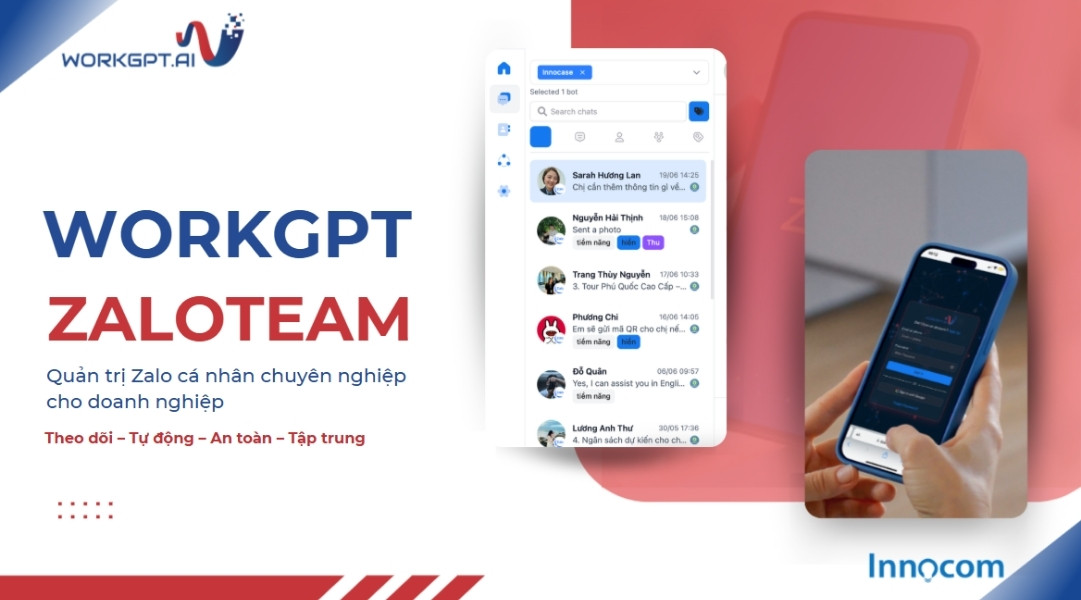
ZaloTeam – "one-touch" sales management with an intelligent reporting system
Managing Sales without constant follow-ups is a data-driven monitoring approach powered by ZaloTeam and AI virtual assistants. It allows managers to track the entire interaction history, response times, and consultation quality of employees on a centralized platform. Instead of manual follow-ups, ZaloTeam’s reporting system automatically aggregates performance indicators (KPIs), alerts managers to risks, and stores conversations, helping customer service operations run “more simply, faster, and more accurately.”
What is ZaloTeam? Why do businesses need ZaloTeam management?
ZaloTeam is a centralized personal Zalo management solution for businesses, allowing employees to interact directly with customers while managers can monitor the entire conversation history on a single platform. It is a strategic tool that helps businesses preserve 100% of customer data, control consultation quality, and optimize Sales team performance through a real-time data reporting system.
Why should businesses adopt ZaloTeam today?
Allowing employees to use separate personal Zalo accounts for work often creates major management risks. ZaloTeam addresses these issues through the following core advantages:
Protecting data assets: The system automatically stores the entire conversation history, including deleted or recalled messages. Businesses no longer have to worry about losing customer information when employees leave.
Professional monitoring and access control: Managers can monitor message content, control violations, and assign access permissions based on specific accounts or tasks. This ensures that customer service processes remain consistent and professional.
Data-driven decision-making: Instead of relying on subjective follow-ups or reminders, the multi-dimensional reporting system on interactions, response times, and KPIs gives managers an accurate view of business performance.
Comprehensive information security: The solution follows strict security policies and meets ISO 27001 standards, ensuring that all conversation data is securely encrypted.
Integration with an intelligent AI assistant: ZaloTeam allows businesses to integrate an AI Chatbot to automatically respond to customers 24/7, filter prohibited keywords, and alert managers to negative conversations for timely intervention.
In the digital era, customer data is one of the most valuable assets of any business. Adopting ZaloTeam can save up to 90% of monitoring time while creating an operating structure that is “simpler, faster, and more accurate.”
See also: Should SMEs build or buy an AI Chatbot to support customers?
ZaloTeam’s reporting system: The “eyes and ears” for hands-off management
New Contact report
The New Contact report helps businesses accurately measure the real-time growth rate of potential customers coming into Zalo accounts. This data provides an important basis for evaluating the effectiveness of Marketing campaigns and the Sales team’s ability to generate Leads.
Key metrics:
Total Contacts: Records all new customers who send messages during the day.
Customers who provided phone numbers: Provides detailed statistics on the number of customers who have provided identifying information for synchronization with the ABMS CRM system.
Managers can use the toolbar to filter data by Bot/Channel, Tag, Period, or Date Range, then click Generate report to update the latest figures.
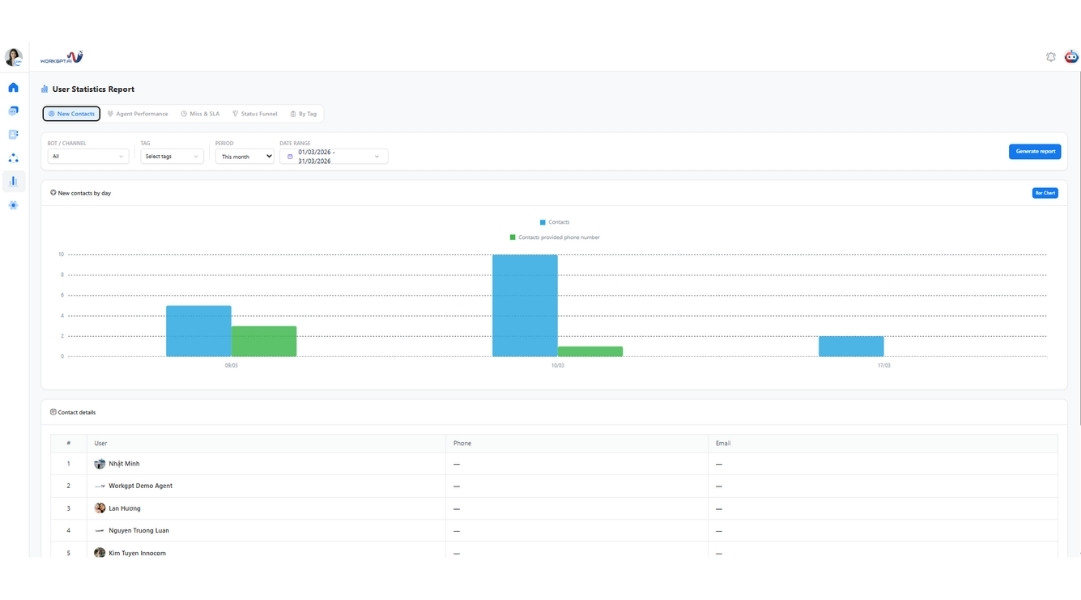
New contacts
Agent Performance report
The Agent Performance report provides a multi-dimensional view of each employee’s productivity based on their actual volume of customer interactions.
Ratio by conversation: Tracks the ratio and number of customers each Sales representative is directly handling (for example, Sales A messages 2 customers while Sales B messages 3 customers).
Ratio by messages: Measures workload based on the number of messages sent by each employee (for example, 94 messages, 100 messages, etc.).
User statistics detail: Provides an overview of how many accounts have messaged how many customers and identifies the source of each message, whether sent from the system’s Portal app or directly from the Zalo application, helping businesses monitor the process.
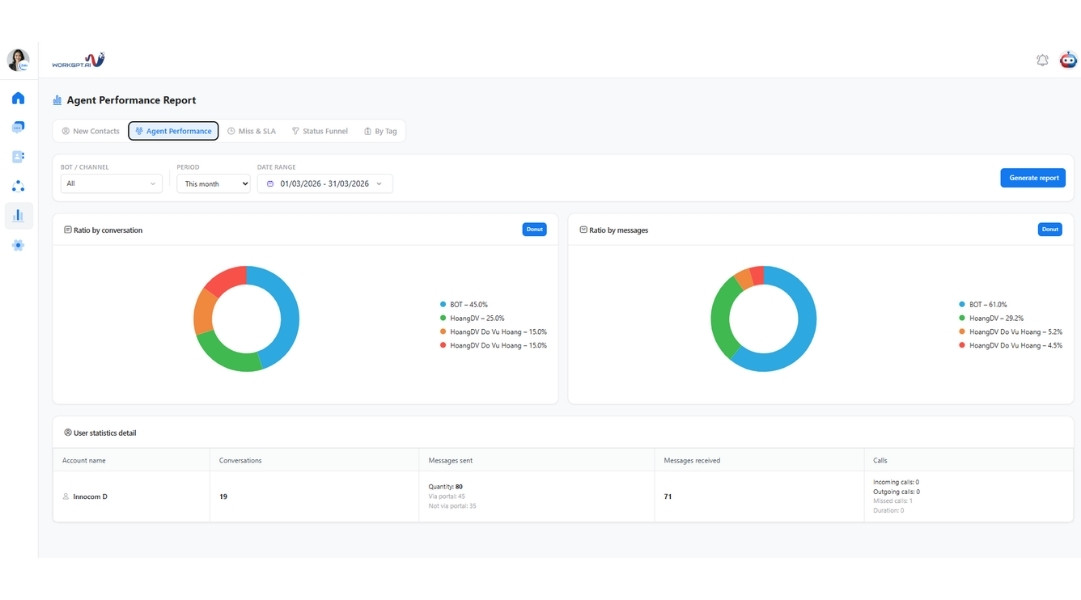
Agent Performance
Miss & SLA report
The Miss & SLA report acts as an “early-warning system” that helps managers monitor customer response times and ensure that no sales opportunity is missed.
SLA Configuration
This feature allows businesses to customize standard response times and working hours so that the system can record violations fairly and accurately.
Morning Time / Afternoon Time / Night Time: Allows businesses to define specific periods when Sales representatives are on duty (for example, 09:00 AM – 12:00 PM).
The system only calculates SLA violations during these designated periods.
Time SLA (minutes): Defines the maximum allowed response time before a violation is recorded (for example, 15 minutes).
If Sales does not respond within this time, the system automatically places the conversation under SLA Exceeded.
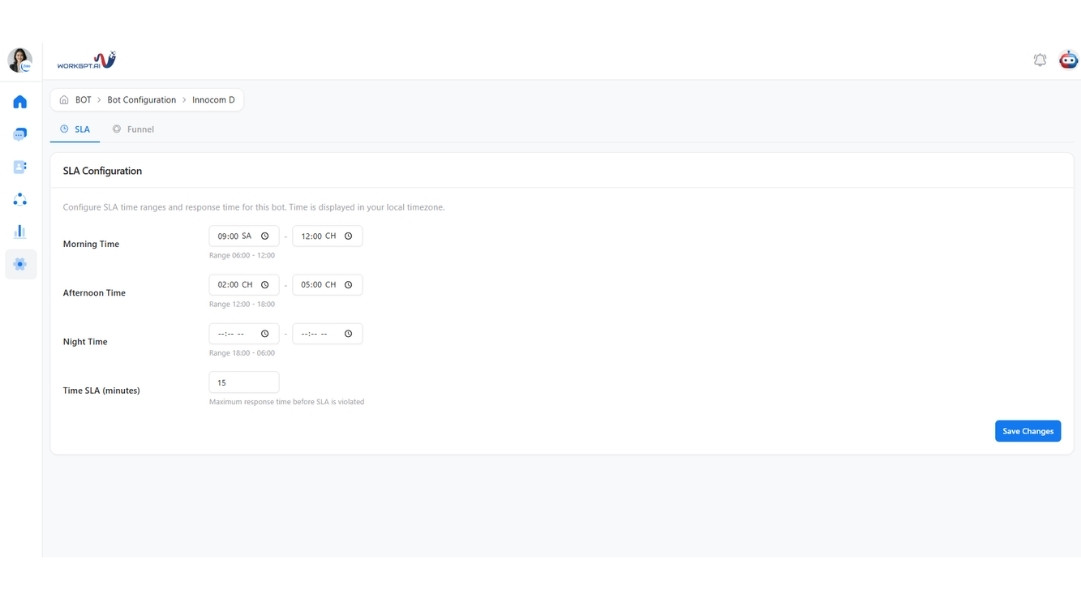
SLA configuration
Response statuses to monitor:
Unreplied: Tracks messages that have not been answered within the configured standard SLA period (for example, within the first 15 minutes).
SLA Exceeded: Records cases where Sales has not responded within the specified time limit, from after 15 minutes to less than 3 days.
Stale: Alerts managers to conversations that have remained inactive for more than 3 days, allowing them to promptly remind Sales to follow up with existing customers.
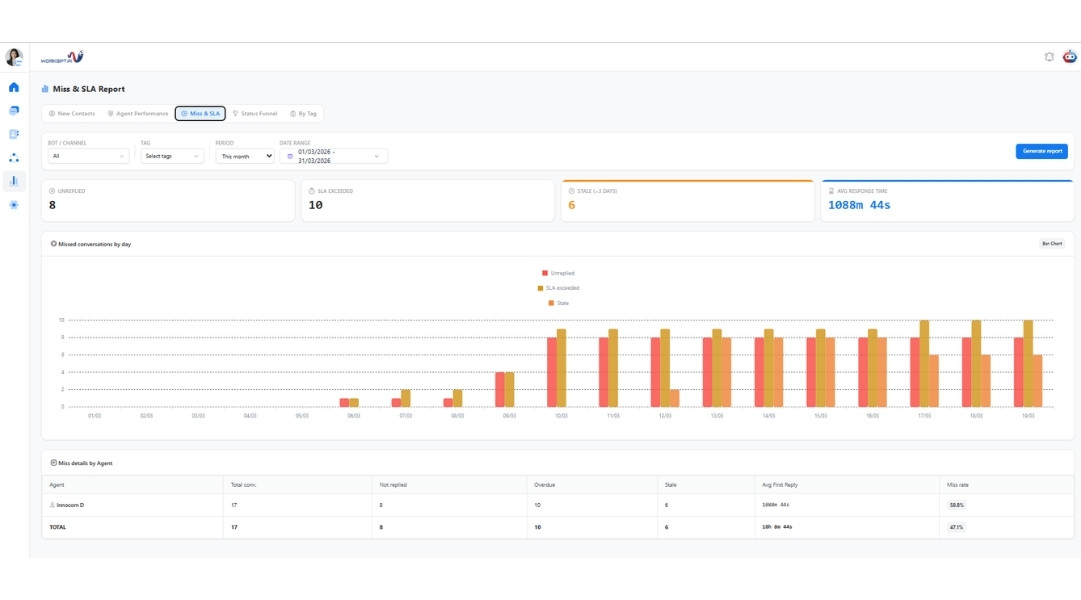
Miss & SLA
Status Funnel report
The Funnel system visualizes the customer journey from initial contact to a successful or unsuccessful sale.
Funnel setting:
Auto assign funnel: When enabled, the system automatically displays the funnel status bar within the chat window whenever a new customer sends a message, allowing Sales to classify the customer immediately.
Stage type: Allows businesses to clearly define Win stages, which represent successful conversions, and Lost stages, which represent unsuccessful outcomes, enabling the system to automatically calculate ROI rates.
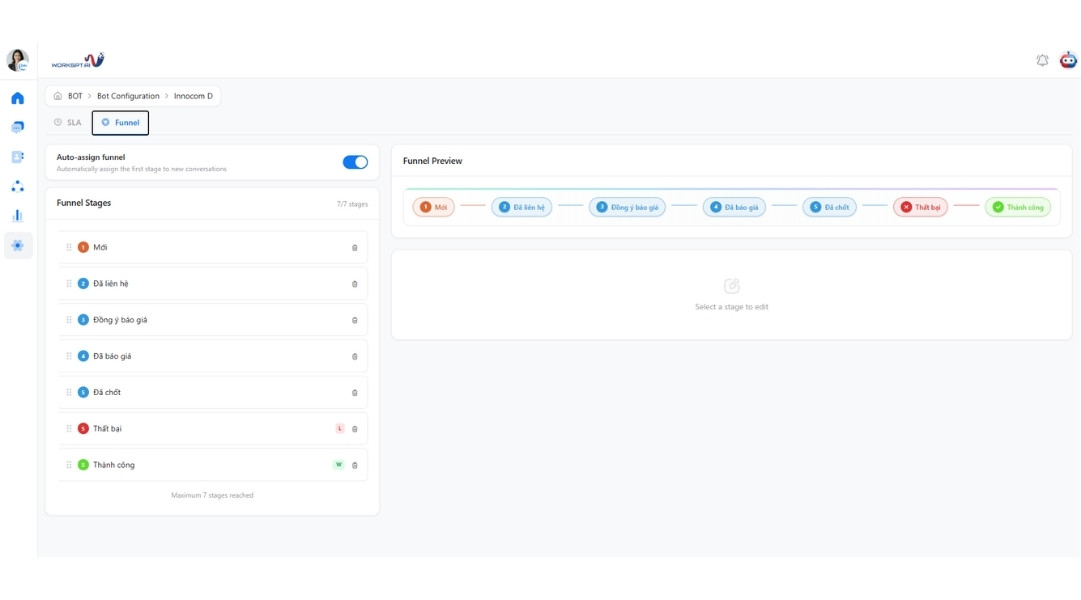
Funnel configuration
Status Funnel analysis
Managers can see which customer status has the highest number of customers “stuck” in it. If the number of customers in the “considering” stage is high, the business needs to encourage Sales to provide deeper follow-up and consultation to avoid wasting Leads.
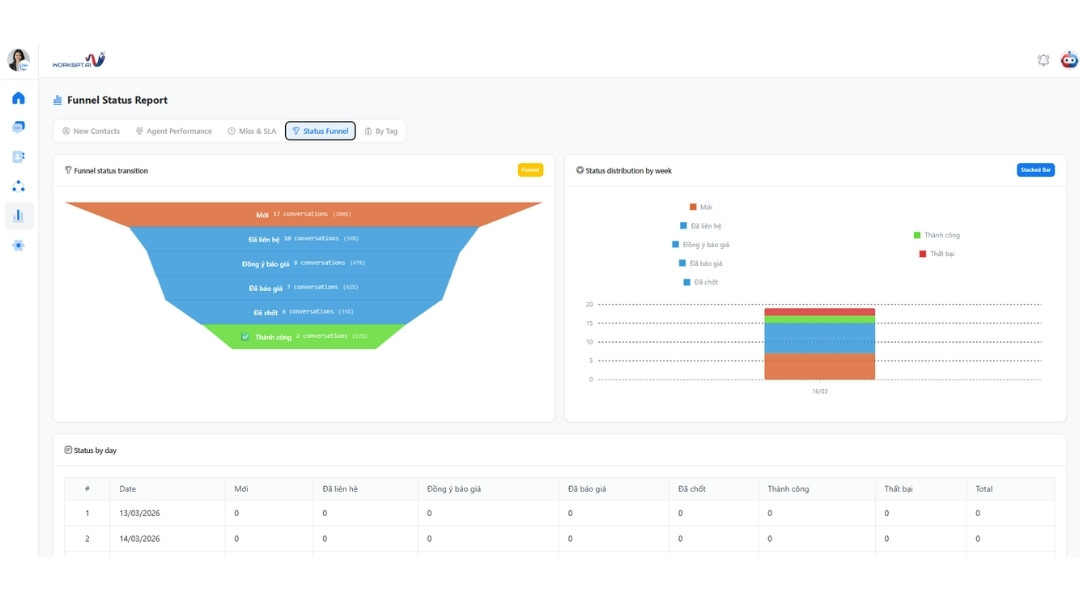
Status funnel
See also: WORKGPT ZALOTEAM – Professional personal Zalo management for businesses
By Tag report
The By Tag report helps analyze customer characteristics and needs based on classification keywords assigned by Sales during conversations.
Tag statistics: The system automatically aggregates the number and percentage of tags, such as “Potential,” “Phone Number Provided,” “Negative,” and “Closed,” allowing businesses to better understand the characteristics of their customer base.
Campaign optimization: Based on tag volumes, managers can adjust AI assistant consultation scenarios or allocate Sales resources to important customer groups.
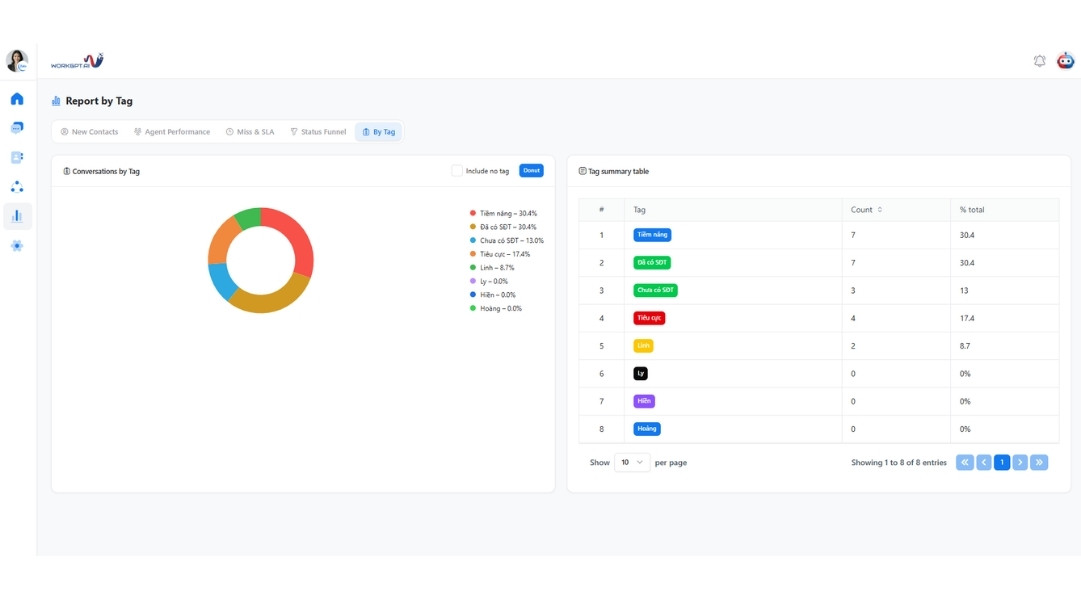
By tag
Important considerations when operating ZaloTeam
To achieve optimal performance and high Citability for management data, businesses should pay attention to the following:
Entity standardization: Clearly identify employee roles and customer tags to ensure the highest reporting accuracy.
ABMS CRM synchronization: Connect conversation data to the centralized management system to turn data into digital assets and support data-driven decision-making.
Comprehensive security: Ensure that the system complies with ISO 27001 standards to protect brand reputation and customer information.
Using ZaloTeam and an AI Chatbot allows managers to stay informed about business performance anytime, anywhere, without constant follow-ups, while creating a transparent and professional working environment. This is an essential step for businesses seeking hands-off operations and optimized revenue in the digital era.
Contact INNOCOM today for a free consultation and experience the ZaloTeam reporting system after just 5 minutes of setup!